


By The Tech Guy
When it comes to home security, the Ring Video Doorbell (2nd generation) is one of the most popular choices. But what makes this little device stand out? It’s a compact powerhouse with a bundle of features, designed to keep you connected to your front door. With motion detection, HD video, night vision, and two-way audio, it offers more than just a doorbell chime. It’s a security upgrade that also makes home life a little easier.
Let’s check out the Ring Video Doorbell’s design, features, performance, and how it stacks up against other battery-powered doorbell competitors. We’ll see if it really deserves a spot on your front door.
THE RECOMMENDATIONS
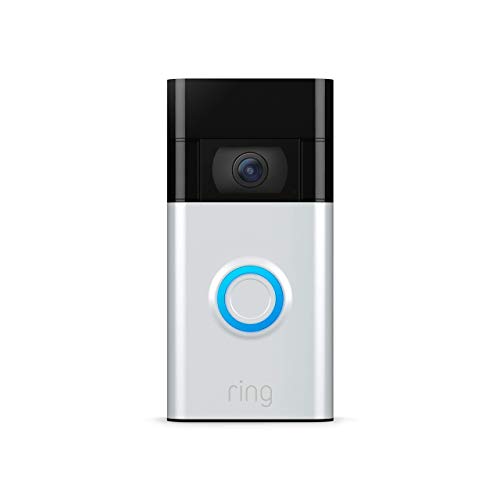 Ring Video Doorbell
The Ring Video Doorbell offers 1080p HD video, motion detection, privacy features, and integrates with Alexa for enhanced in-home monitoring.
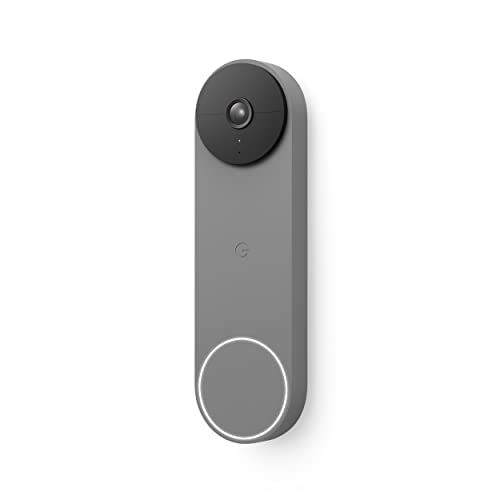 Google Nest Doorbell
The Google Nest Doorbell features intelligent alerts for people, packages, animals, and vehicles, HD video, HDR, night vision, and wired or battery installation.
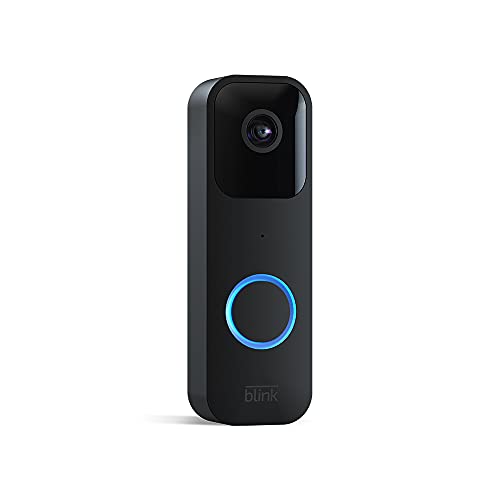 Blink Video Doorbell
The Blink Video Doorbell offers 1080p HD video, infrared night vision, two-way audio, customizable alerts, and both cloud and local storage options.
Subscribe to hear about new gadgets!
Join today and make informed decisions with honest gadget reviews and handpicked recommendations.
THE BREAKDOWN
- Easy installation and user-friendly app
- High-quality video and reliable motion detection
- Sleek design that complements any home exterior
- Two-way audio to communicate with visitors from anywhere
- Subscription required for video recording and storage
- Can be pricier than traditional doorbells (but remember, it’s not just a doorbell)
Ring’s Smart Design
The Ring Video Doorbell has a sleek, compact design. Like most of Ring’s doorbell cameras, this one fits perfectly beside most front doors without being too flashy. It comes in a brushed metal finish that’s modern and subtle, allowing it to blend with most home exteriors. Measuring just over five inches tall, it’s large enough to make a statement but not overwhelming. It’s easy to see why Ring is considered one of the best video doorbells on the market today.
One of the smartest design choices is the option to power it via battery or existing doorbell wiring. This means you have the flexibility to choose between wireless convenience or the reliability of wired power. The installation is surprisingly easy. With a step-by-step guide in the Ring app, even for people who don’t consider themselves handy. Installing a Ring doorbell is a quick and simple DIY project for anyone who wants a smart video doorbell. A great addition to any home that already has security cameras in their security arsenal.
Ring is Packed with Perks
The Ring Video Doorbell comes with a feature set that’s hard to resist. Let’s take a deeper dive into each of its standout features. Each one plays a role in making this doorbell a powerful, convenient, and versatile security option for any home.
1080p HD Video: A Clear View of Your Front Door
The Ring Video Doorbell provides sharp 1080p HD video quality, so you can see who’s at your door in vivid detail. The clarity of the video feed means you won’t have to squint to recognize faces or packages. This high-definition video quality is not just a nice-to-have—it’s essential for identifying visitors clearly, even from a distance. The improved resolution from previous generations ensures you’re not missing out on any critical details in your video clips.
Enhanced Motion Detection: Detect What Matters
Ring has made major improvements in motion detection for this generation of its doorbell. The advanced motion sensors are highly responsive and customizable, allowing you to define activity zones. You can create specific zones to focus on high-traffic areas, like walkways or driveways, while ignoring spots that don’t need monitoring.
This feature also helps avoid false alarms, such as cars passing by or trees swaying in the wind. You receive instant alerts on your phone as soon as movement is detected, letting you react quickly.
Privacy Zones: Respect Boundaries
Privacy zones let you mask certain areas within the camera’s field of view. For example, you can block out parts of your neighbor’s property, a sidewalk, or anything you don’t want to record. This feature helps the Ring Video Doorbell align with privacy regulations. Providing you with control over what’s included in your video feed.
Night Vision: Security After Dark
Night vision is a critical feature for any security camera. And Ring’s infrared night vision ensures you don’t lose sight when the sun goes down. The infrared technology illuminates visitors and movement in low-light or no-light conditions. It creates a clear black-and-white video that still captures essential details like faces, movements, and objects.
Whether it’s a visitor at your door late in the evening or unexpected movement at midnight, night vision has you covered. It will capture all the footage clearly.
Two-Way Audio: Speak to Visitors from Anywhere
The two-way audio feature allows you to hear and speak to visitors directly through the Ring app. You can use it on your smartphone, tablet, or PC. This feature is great for receiving packages, greeting guests, or even handling unexpected visitors.
Ring’s two-way audio is responsive and clear, with minimal lag. It’s also helpful in a security context. You can speak to potential intruders or unwelcome visitors to make it clear that the property is monitored.
Alexa Compatibility: Smart Home Integration
One of Ring’s strongest advantages is its compatibility with Alexa-enabled devices, including the Echo Show, Fire TV, and Fire Tablet. This integration allows Alexa to announce when someone’s at your door and show a live feed on a connected device. You can even respond to basic commands like showing recent footage.
With an active Ring Protect Plan, Alexa can automatically show you the doorbell feed when motion is detected. This makes it easier to keep tabs on visitors without opening the app.
Ring Protect Plan: Record, Save, and Share Videos
The Ring Protect Plan is an optional subscription service that allows you to record, save, and share video footage. Without the plan, you can only access live video. But with it, you have access to up to 180 days of recordings. That includes missed events you might want to review later.
This feature can be crucial in case of an incident. Being able to pull up past footage, download it, and even share it with law enforcement, family, or neighbors can be incredibly valuable.
Real-Time Notifications: Stay Connected Anywhere
Real-time notifications are sent to your phone, tablet, or PC whenever someone presses the doorbell or triggers motion detection. These notifications are immediate, meaning you won’t miss a visitor or important event at your door. The speed of the alerts, paired with the Ring app’s reliability, ensures you’re aware of what’s happening in real-time.
Complete Control from the Ring App: Your Command Center
The Ring app is where everything comes together. The app offers complete control of the doorbell’s features. Letting you view live footage and communicate via two-way audio. You can adjust motion settings, set privacy zones, and manage alerts. It also allows you to access saved video recordings if you subscribe to the Ring Protect Plan.
The app is intuitive and easy to navigate. This makes it a seamless experience whether you’re tweaking security settings or reviewing recent footage.
These features combine to create a robust, user-friendly experience that’s hard to beat in a video doorbell. From clear visuals and audio to smart integrations and privacy settings, the Ring Video Doorbell is packed with options. These make monitoring your doorstep both effective and convenient.
How Does Ring Stack Up?
Let’s talk performance! The Ring Video Doorbell offers 1080p HD video quality, which is impressive for a doorbell camera. The image remains clear and sharp, even in varying weather conditions. Plus, the night vision mode ensures you’re not left in the dark when it matters most.
The motion detection works well and can be customized to prevent constant alerts. With the customizable zones, you can set up areas of focus to avoid unnecessary notifications. Like every passing car or a swaying tree. Additionally, the two-way audio has minimal lag, allowing for clear conversations with visitors without much delay.
When connected to existing doorbell wiring, the Ring stays constantly powered, so you don’t need to worry about recharging. For battery users, expect about six months of usage before needing a charge, depending on how active your doorstep is.
Simple Setup and Easy Control
Setting up the Ring Video Doorbell is refreshingly easy. You start by downloading the Ring app, connecting the doorbell to Wi-Fi, and following the in-app setup. The process is foolproof, with step-by-step guidance and visual cues to ensure everything is done right.
Once installed, using the Ring Video Doorbell is seamless. You’ll get real-time notifications directly to your phone or tablet. And with the Live View button, you can instantly view your front door. The Ring app’s layout is user-friendly. It’s easy to access video, adjust settings, and view recorded clips if you’re subscribed to the Ring Protect Plan.
The integration with Alexa devices makes the experience even better. If you have an Echo Show, Fire TV, or Fire Tablet, you can easily view your Ring video feed. Alexa can also announce visitors, adding an extra layer of convenience.
Is It Worth It?
The Ring Video Doorbell sits at a fair price-point considering its extensive feature set amongst wired and battery-powered models. You’re getting HD video, two-way audio, night vision, and motion alerts all in one device. It’s a worthwhile investment if you’re seeking a mix of security and convenience.
With the Ring Protect Plan, you can unlock recording, save and share options. Valuable features if you want extra security or record-keeping. While the subscription adds to the overall cost, it isn’t required for the Ring Video Doorbell’s main functions. It’s optional based on your needs.
THE COMPETITION
- Versatile installation options (battery-powered or wired)
- Advanced detection capabilities enhance security
- Excellent video quality with handy night vision
- Direct integration with Google Home and Amazon Alexa for broader smart home connectivity
- Continuous recording is not available, even with a subscription
- Limited historical video access without a paid subscription
- Compatibility issues with older Nest apps and websites
The Google Nest Doorbell offers a comprehensive approach to home security, blending smart technology with an intuitive, user-friendly experience. Its standout feature is built-in AI that distinguishes between people, packages, animals, and vehicles. This means you receive tailored alerts directly to your phone, reducing unnecessary notifications and focusing on what matters most.
The Nest Doorbell is easy to install, offering both wired and battery-powered options to fit any setup. Wireless installation is ideal for renters or those without existing doorbell wiring, while hardwired installation provides constant power for those who prefer it. The Nest’s sleek design in neutral colors complements any home exterior, adding style to function.
One key feature is its 24/7 HD video with HDR and night vision. The high-quality video stream ensures clear visibility day or night, allowing you to monitor your door from anywhere. The doorbell’s vertical field of view also captures more of the visitor’s body and any packages left on the ground.
Google Nest includes three hours of free event history, so you can review missed activities without a subscription. For extended storage, the Nest Aware subscription offers up to 60 days of event history, adding extra value for those who want robust recording options. Additionally, if your Wi-Fi or power goes out, the Nest Doorbell can store up to one hour of recorded events, a thoughtful feature that ensures you don’t miss important footage.
Comparing the Google Nest Doorbell to the Ring Video Doorbell reveals some interesting differences. Both offer 1080p HD video, two-way audio, and night vision, making them reliable options for home security. However, Nest’s AI-driven alerts set it apart, providing more nuanced notifications than Ring’s basic motion detection. Nest’s compatibility is primarily with Google Assistant and Amazon Alexa, making it ideal for homes already integrated into the Google ecosystem. On the other hand, Ring offers greater flexibility with Alexa-centric smart home setups.
The Ring Video Doorbell offers an optional Protect Plan for video storage and additional security features, similar to Nest’s Aware subscription. However, one notable difference is that the Ring Video Doorbell can connect to existing wiring for continuous power and, in some cases, 24/7 recording, something the Nest Doorbell currently lacks.
Google Nest’s integration with the Google Home app offers a smooth user experience. Through the app, you can check live video feeds, receive real-time alerts, and interact with visitors. Integration with Google Assistant adds value for smart home users, making it possible to stream video hands-free on compatible Google or Amazon smart displays.
In conclusion, the Google Nest Doorbell brings a unique combination of intelligent features and flexible installation. Its built-in AI, high-definition video, and customizable notifications enhance security while providing convenience and peace of mind. Although the Ring Video Doorbell is a strong alternative with similar features, Nest’s AI-driven notifications and Google compatibility make it a top choice for smart home enthusiasts.
- Easy installation and flexible power options (battery or wired)
- High-quality video and reliable motion detection
- Multiple storage options cater to different needs and preferences
- Alexa compatibility enhances user experience
- Requires additional purchases for optimal functionality (Sync Module 2 for local storage)
- No continuous recording; only records clips based on motion or when the bell is rung
- Subscription required after the initial 30-day trial for cloud storage
The Blink Video Doorbell is an affordable, compact solution for home security, offering key features like 1080p HD video, motion detection, and two-way audio. Designed for flexible installation, it can be battery-powered or hardwired to fit different home setups, making it ideal for both renters and homeowners. Its small size and sleek look blend seamlessly with any home décor, while its weather-resistant build ensures reliable performance in various climates.
One of the Blink Video Doorbell’s main advantages is its customizable storage options. You can save footage to the cloud with a Blink Subscription Plan, or use local storage with the Sync Module 2 (sold separately) and a USB drive. This flexible approach to storage is a standout feature for budget-conscious users who prefer not to commit to monthly subscription fees. Plus, Blink includes a free 30-day trial of its subscription service, so users can explore cloud storage before deciding.
The Blink Video Doorbell also pairs seamlessly with Amazon Alexa, allowing you to receive notifications and respond to visitors using compatible Alexa devices. If paired with a Sync Module, you gain on-demand access to live view and two-way audio, which is especially useful for monitoring your door on your terms. Without the Sync Module, these features are only available when the doorbell is pressed or motion is detected, which may suit users looking for basic functionality.
Compared to the Ring Video Doorbell, Blink is more cost-effective and provides straightforward security features. Both devices offer HD video, night vision, motion detection, and two-way audio. However, Ring’s higher price tag is justified by its broader ecosystem, which includes more advanced motion zones and customization, privacy zones, and compatibility with the Ring Protect Plan for extended video history. Unlike Blink, which requires the Sync Module for on-demand live view and two-way audio, Ring offers these features readily without extra hardware, adding convenience for users who value immediate control.
The Ring Video Doorbell is also compatible with Google Assistant and Alexa, while Blink is more Alexa-centric, making it ideal for users already in Amazon’s ecosystem. Additionally, Ring’s subscription offers up to 180 days of video history storage, more than Blink’s maximum of 60 days with the Blink Subscription Plan.
The Blink Video Doorbell is an excellent choice for users looking for affordable, reliable home security without excessive commitment. Its simplicity, long battery life, and flexible storage make it a practical solution for basic home monitoring. If you’re searching for a budget-friendly, easy-to-install security device, Blink provides essential features for peace of mind at a fraction of the price.
Overall, the Blink Video Doorbell offers good value, especially for those prioritizing flexibility and affordability. While the Ring Video Doorbell has more advanced options for customization, Blink provides essential, straightforward features at a budget-friendly price. With Blink, you get dependable home security without a steep investment, making it a strong choice for users who value simplicity and savings.
THE FINAL VERDICT
The Ring Video Doorbell is a fantastic option for anyone looking to add security and peace of mind to their home. From its easy installation and advanced features to its impressive picture quality and audio quality, this smart doorbell camera delivers. It combines practicality with a friendly, easy-to-use interface, making it a solid choice for tech newbies and experts alike.
Whether you’re looking for a wired doorbell or wireless doorbell, the Ring Video Doorbell gives you both options in one. It’s easy to see why this smart doorbell has always been a top pick amongst other Ring products.
If you want a doorbell camera that’s smart, functional, and dependable, the Ring Video Doorbell deserves serious consideration. It’s not just a doorbell; it’s a helpful, watchful eye that keeps your home connected and secure, 24/7.
THE FAQ
-
Do I need a subscription to use the Ring Video Doorbell?
Basic functionality such as live view and two-way talk is available without a subscription. However, to access recorded videos and use the Ring Protect Plan features like video history for up to 60 days, you will need a subscription.
-
Can the Ring Video Doorbell work without being hardwired?
Yes, the Ring Video Doorbell can operate on its built-in rechargeable battery, making it versatile for users who cannot or prefer not to hardwire their doorbell.
-
How does the motion detection work?
The motion detection feature uses advanced sensors and algorithms to detect movement in customizable zones in front of your door. You can adjust the sensitivity and specify areas to monitor through the Ring app.
-
Is the Ring Video Doorbell weatherproof?
Yes, the Ring Video Doorbell is designed to withstand various weather conditions, including rain, snow, and extreme temperatures.
-
Can I see who is at my door at night?
Yes, the Ring Video Doorbell is equipped with infrared night vision, allowing you to see visitors in the dark clearly.
-
How can I communicate with someone at my door?
The Ring Video Doorbell features two-way talk, enabling you to hear and speak with visitors through your smartphone, tablet, or PC using the Ring app.
-
What is the installation process like for the Ring Video Doorbell?
Installation is straightforward and can typically be done by the user. It includes mounting the bracket and securing the doorbell to it. You can choose to hardwire it to your existing doorbell system for continuous charging or use it with the rechargeable battery.
-
How do I charge the Ring Video Doorbell if it’s battery-powered?
If your Ring Video Doorbell is battery-powered, you’ll need to remove the device from its mounting bracket and use the included micro-USB cable to charge it. A full charge usually takes a few hours.
-
Can I integrate the Ring Video Doorbell with other smart home devices?
Yes, the Ring Video Doorbell integrates with various smart home devices, especially those within the Amazon ecosystem, allowing for voice commands and automation with devices like Amazon Echo.
-
Is there a warranty for the Ring Video Doorbell?
Yes, the Ring Video Doorbell comes with a 1-year limited warranty that covers defects in materials and workmanship under ordinary consumer use from the date of original retail purchase. Contact Ring customer service for more detailed information.
Subscribe to hear about new gadgets!
Join today and make informed decisions with honest gadget reviews and handpicked recommendations.
