

By The Tech Guy
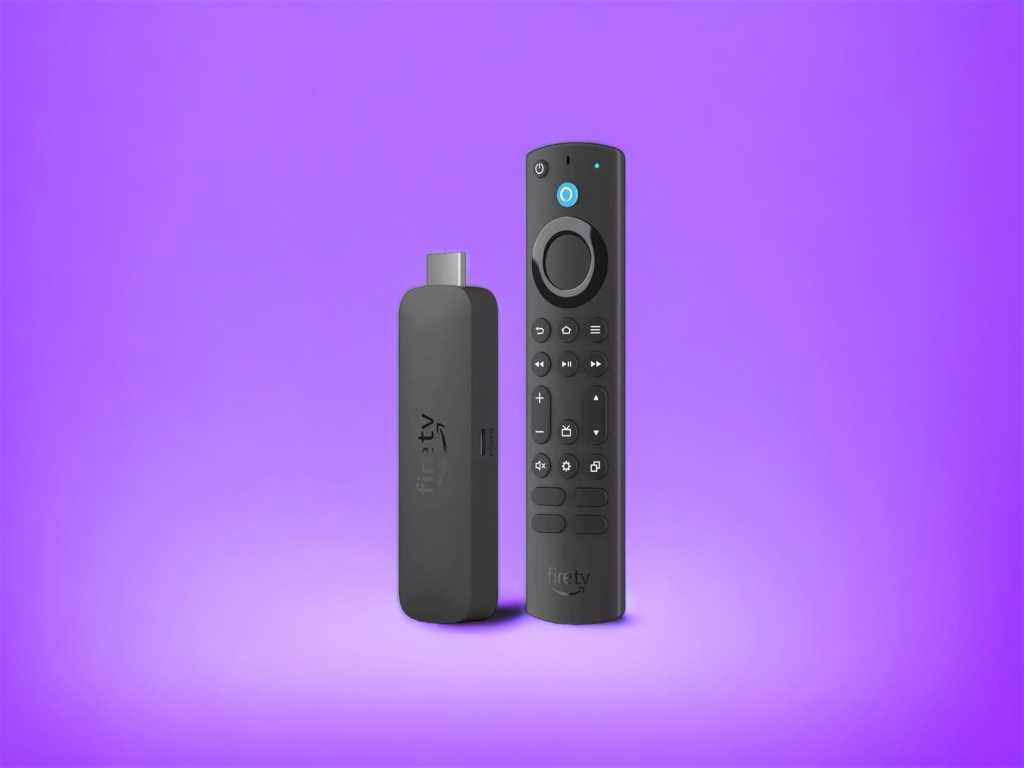
Welcome to the future of streaming with the Amazon Fire TV Stick 4K Ultra HD! This little gadget is here to revolutionize your home entertainment system with all the bells and whistles you could imagine. Whether you’re a movie buff or just looking for a smarter viewing experience, the Fire TV Stick 4K awaits you. It’s a huge leap forward from the original Fire TV stick. And clearly one of the best Fire TV devices available today.
Let’s dive into the details and have a closer look at what makes this latest Fire TV stick so special.
THE RECOMMENDATIONS
 Amazon Fire TV Stick 4K Ultra HD
The Amazon Fire TV Stick 4K Ultra HD delivers advanced 4K streaming, Xbox cloud gaming, Alexa integration, and smart home controls for a complete experience.
 Roku Streaming Stick 4K HDR10+
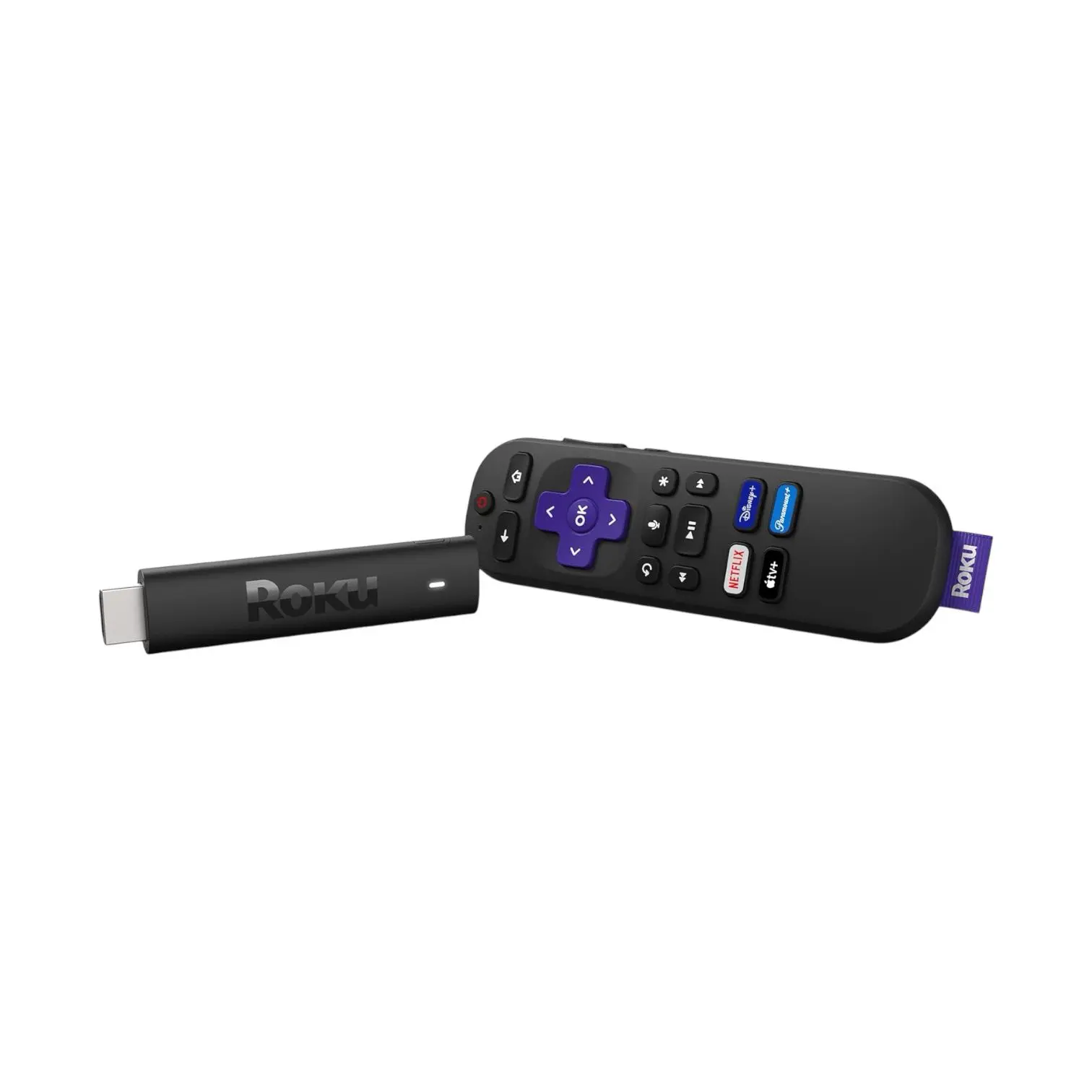
The Roku Streaming Stick 4K offers discreet, powerful streaming with 4K, HDR10+, and Dolby Vision, enhanced by voice control and extensive channel options.
 Chromecast with Google TV 4K HDR
Chromecast with Google TV 4K supports Bluetooth, Wi-Fi, and voice searches, offers personalized viewing recommendations and an eco-friendly design.
Subscribe to hear about new gadgets!
Join today and make informed decisions with honest gadget reviews and handpicked recommendations.
THE BREAKDOWN
- Incredible 4K Ultra HD streaming with Dolby Vision and HDR10+
- Alexa Voice Remote makes navigation and smart home control effortless
- Supports Xbox cloud gaming without the need for a console
- Wi-Fi 6 ensures fast, smooth streaming
- Access to over 1.5 million shows and movies
- Tons of free content via apps like Tubi, Pluto TV, and Freevee
- Compact, portable, and easy to set up
- Some apps require separate subscriptions (Netflix, Prime Video, etc.)
- No Ethernet port, so it relies entirely on Wi-Fi
Small Stick, Big Entertainment
At first glance, the new Fire TV Stick 4K Ultra HD doesn’t look like much. It’s a small, unassuming black stick that plugs into the back of your TV. But don’t let its size fool you. This tiny device is more than a media streamer and packs a powerful punch over the previous generation. Inside its slim design is a gateway to thousands of shows and movies through the Amazon Prime Video streaming service. You also get access to a variety of games available on the Fire TV platform.
It’s portable, easy to set up, and blends seamlessly with your entertainment setup. What’s not to love?
More Than Just a Stick!
Let’s dive into the Amazon Fire TV Stick 4K Ultra HD‘s standout features over other streaming media players. This device is packed with functionality designed to elevate your streaming, gaming, and smart home experiences. Here’s a detailed look at each of the key features that make this the best streaming device for your home.
4K Ultra HD Streaming
When it comes to video quality, the Fire TV Stick 4K Ultra HD truly shines. It delivers crisp, vibrant 4K Ultra HD resolution, which offers four times the detail of full HD video formats. You’ll notice that images are sharper, colors pop with vibrancy, and every detail is more defined. If you’re watching nature documentaries or high-action sequences in blockbuster films, the difference is immediately noticeable.
But that’s not all—it also supports Dolby Vision, HDR10+, and HLG. Let’s break down what those mean:
- Dolby Vision: This offers greater brightness, contrast, and a wider color range, making everything look more lifelike.
- HDR10+: Built to support HDR (High Dynamic Range) features. These enhances the color and contrast in each frame, making everything look much more realistic.
- HLG: Hybrid Log-Gamma is a form of HDR specifically designed for live broadcasts, so live sports and events look stunning.
Coupled with these advanced picture technologies is Dolby Atmos audio support. If you have a Dolby Atmos-enabled sound system, the Fire TV Stick 4K Ultra HD delivers an immersive audio experience. You’ll feel like you’re right in the middle of the action, with sound flowing all around you. Perfect for action movies, concerts, or games.
Xbox Cloud Gaming
This feature is a real game-changer—literally! With the Fire TV Stick 4K Ultra HD, you can access Xbox games without owning an Xbox console. Thanks to cloud gaming via Xbox Game Pass Ultimate, you can stream high-quality games directly on your TV.
Here’s what makes this feature so exciting:
- Stream Popular Games: Play titles like Forza Motorsport, Starfield, and Palworld with no downloads or installations needed. Just plug in a controller, and you’re good to go.
- No Console Required: You don’t need a bulky console or expensive gaming PC to play Xbox games. The Fire TV stick streams them directly from the cloud. Perfect if you’re tight on space or want to avoid the cost of buying a gaming setup.
- Seamless Integration: The Fire TV stick integrates Xbox Game Pass Ultimate smoothly into your TV’s interface. This makes it easy to jump between streaming and gaming.
If you’re a casual gamer or just getting into gaming, this feature lets you try out hundreds of games. All without the commitment of buying new hardware or the need for a major game system. The Fire stick also comes with 8 GB of RAM for storage of both apps and games.
Alexa-Powered Voice Search
We’ve all been there—endless scrolling through menus, trying to find something to watch. With the Fire TV Stick 4K Ultra HD, Alexa takes care of that for you. The AI-powered Alexa Voice Remote enhanced search allows you to search for content using just your voice. This makes the process faster and much more intuitive.
Here’s how you can use Alexa to enhance your search experience:
- Search by Actor or Plot: Want to watch all movies starring Tom Hanks? Just say, “Alexa, find Tom Hanks movies,” and it’ll give you a list.
- Find by Movie Quote: Looking for a specific movie, but can’t remember the name? Try quoting a famous line, like “Alexa, find the movie with the line ‘here’s looking at you, kid’”. You’ll instantly get a list of relevant films.
- Smart Suggestions: Alexa doesn’t just show you what’s available. It also learns from your viewing habits to recommend content tailored to your tastes.
This search functionality works across multiple streaming platforms, so you don’t have to dig through individual apps to find what you want. Alexa can do the heavy lifting for you, saving you time and effort.
Wi-Fi 6 Support
The Fire TV Stick 4K Ultra HD features support for Wi-Fi 6, the latest and greatest in wireless technology. This is especially useful for homes with multiple devices connected to the same home network, where bandwidth can be limited. Wi-Fi 6 delivers faster, more reliable internet connections, even when several people are using the network at the same time.
Here’s why Wi-Fi 6 is a big deal:
- Faster Speeds: Wi-Fi 6 is designed to handle faster data transfers, meaning smoother 4K streaming with less buffering.
- More Efficient for Busy Networks: Got a house full of smart devices—phones, tablets, laptops, or other streaming gadgets? Wi-Fi 6 ensures your Fire TV stick doesn’t get bogged down by network congestion.
- Future-Proof: As more devices and internet services adopt Wi-Fi 6, you’ll be ready. Your Fire TV stick is ready for the next generation of internet speed and connectivity.
This feature makes the Fire TV Stick 4K perfect for homes with high streaming needs and busy Wi-Fi networks.
Free Content
Streaming services can get pricey, especially when you add up subscriptions for Netflix, Disney+, and others. But with the Fire TV Stick 4K Ultra HD, you don’t need a paid subscription to enjoy tons of content.
You get access to over 300,000 free movies and TV episodes from popular ad-supported apps like:
- Amazon Freevee
- Tubi
- Pluto TV
- Fire TV Channels
While subscription-based services offer premium content, these free options are perfect for budget-conscious viewers. There’s no shortage of movies, TV shows, and Live TV channels to enjoy without spending an extra penny.
Alexa Voice Remote
The Alexa Voice Remote included with the Fire TV Stick 4K Ultra HD isn’t just for changing channels. It’s your gateway to controlling your entire home, all from your couch. The remote comes equipped with new feature buttons for popular streaming apps, as well as TV power and volume controls. This all-in-one solution makes it one of the best Fire TV stick features available.
Here’s what you can do with the Alexa Voice Remote:
- Control Smart Home Devices: If you’ve got smart lights, cameras, or thermostats, you can control them by pressing a button and asking Alexa. You can dim the lights, check the front door camera, or adjust the thermostat without getting up.
- Quick App Launching: The remote has dedicated buttons for popular streaming services like Netflix, Prime Video, and Disney+. You can get to your favorite apps with just one press.
- Voice Commands: Find content, adjust volume, or even get weather updates with simple voice commands. Just say, “Alexa, play The Mandalorian,” and it’s done.
This remote is a powerful little tool that simplifies controlling your entertainment and your smart home.
Endless Streaming Options
One of the major selling points of the Fire TV Stick 4K Ultra HD is the amount of content available. With access to over 1.5 million movies and TV episodes, there’s no shortage of options to choose from. Whether you subscribe to multiple streaming platforms or prefer free ad-supported content, the Fire TV Stick 4K Ultra HD brings all your favorite apps into one interface.
Here are the platforms you’ll have at your fingertips:
- Paid Services: Netflix, Prime Video, Disney+, HBO Max, Apple TV+, and more are all easily accessible. Each app is integrated into the Fire TV ecosystem for seamless use.
- Live TV: With apps like Hulu Live, YouTube TV, and Sling, you can cut the cord and still watch live television, including sports and news channels.
- Specialized Content: Whether you love anime, horror, documentaries, or kids’ shows, there are specialized apps available for every niche.
This endless variety ensures that whether you’re in the mood for a binge-worthy series or a quick movie, you’ll never run out of options.
Lightning Fast and Smooth as Butter
So, how does it actually perform? In one word: flawlessly. Whether streaming a movie or having a quick game of Forza, the Fire TV Stick 4K never missed a beat. The new, faster processor gives it a boost in speed compared to older Fire TV sticks. This makes loading times nearly non-existent. Switching between apps is instant, and the Wi-Fi 6 support ensures that everything runs smoothly, even with multiple devices connected to my network.
There’s also no noticeable lag when using voice commands. The Alexa Voice Remote is incredibly responsive, and the Fire TV Stick reacts almost instantly. Whether you’re searching for movies or adjusting smart home devices, everything happens without delay.
As Easy as Streaming Gets
One of the best things about the Fire TV Stick 4K Ultra HD is how easy it is to use. Setup is as simple as plugging it into your TV, connecting to Wi-Fi, and signing into your streaming accounts. The interface is user-friendly and intuitive, making it easy to find exactly what you want to watch. The Fire TV home screen is well-organized, displaying your apps, recommendations, and recently watched shows all in one place.
The Alexa Voice Remote adds to the ease of use. Controlling everything with your voice makes navigating a breeze, and it’s great for anyone who finds traditional remotes cumbersome. The smart home integration is another win—controlling devices like lights and cameras from your TV makes life just a little more convenient.
A Streaming Bargain
When you look at everything the Fire TV Stick 4K Ultra HD offers, it’s hard to argue with its value. For a device that costs less than dinner, you get advanced 4K streaming, cloud gaming, and AI-powered searching. That’s a ton of value even for someone on a tight budget with little extra money. And like most Amazon devices, you also get the benefit of smart home integration. It’s an entertainment powerhouse that doesn’t break the bank.
If you’re someone who loves watching shows and movies—or gaming without a console—it’s a no-brainer. The amount of free content available also adds to its overall value, making it a great choice for budget-conscious streamers.
THE COMPETITION
- Features long-range Wi-Fi, providing reliable streaming even in rooms far from the router
- Includes voice remote for easy search, compatible with Siri, Alexa, and Google Assistant
- Supports 4K, Dolby Vision, and HDR10+ for sharp resolution and vivid colors
- Massive selection of free, live, and premium TV channels
- Optimal performance is heavily reliant on a strong Wi-Fi connection
- A 4K HDR TV is recommended for best quality, which could mean an upgrade for some users
The Roku Streaming Stick 4K is a compact, easy-to-use device offering 4K HDR10+ and Dolby Vision for stunning picture quality. Its long-range Wi-Fi ensures smooth, buffer-free streaming from anywhere in your home, making it perfect for fast, reliable streaming. The included voice remote controls both your TV and the Roku device. It provides easy navigation and control over your entertainment with simple voice commands.
With access to over 350 free live TV channels and all major streaming services like Netflix, Hulu, and Prime Video, Roku offers a wide variety of content at your fingertips. The interface is simple and intuitive, making it easy to find what you want to watch quickly.
Compared to the Amazon Fire TV Stick 4K, Roku excels in ease of use and offers a straightforward interface without overwhelming users with extra features. However, the Fire TV Stick 4K provides stronger integration with Alexa and additional features like Xbox Cloud Gaming.
Overall, the Roku Streaming Stick 4K is an excellent choice for those seeking a straightforward, high-quality streaming experience with minimal fuss, offering excellent performance at an affordable price. It’s ideal for anyone looking for simplicity and powerful streaming options.
- Thanks to 4K and HDR support, everything looks more vibrant and lifelike
- Works flawlessly with other Google services and devices
- Set up a kids’ profile with fun themes and robust parental controls for peace of mind
- Like most streaming devices, it requires a strong Wi-Fi connection to perform best
- Lacks additional ports like USB or Ethernet, which might be an issue for users with specific needs
The Chromecast with Google TV 4K is a compact, powerful streaming device that offers stunning 4K HDR picture quality. It integrates Google TV, which organizes all your streaming apps into one easy-to-navigate interface. It gives you personalized recommendations based on your viewing habits. With Google Assistant built in, you can control the device using simple voice commands. Search for shows and manage smart home devices with ease.
A standout feature is the ability to create kids’ profiles with parental controls, offering a family-friendly experience. Chromecast is also eco-conscious, made with recycled materials to reduce waste. This device is perfect for those already in the Google ecosystem, providing a seamless experience with other Google services.
Compared to the Amazon Fire TV Stick 4K, Chromecast offers a more user-friendly interface and personalized recommendations through Google TV. While both devices offer 4K HDR and voice control, Fire TV Stick 4K is better for users who prioritize Amazon Alexa integration and gaming via Xbox Cloud Gaming.
Overall, the Chromecast with Google TV 4K provides an excellent balance of performance, smart features, and eco-friendly design, making it a top choice for upgrading your TV experience.
THE FINAL VERDICT
The Amazon Fire TV Stick 4K Ultra HD is a fantastic streaming device that offers an impressive mix of features, power, and value. From stunning 4K video quality to Xbox cloud gaming, this little gadget punches well above its weight. It’s perfect for binge-watchers, casual gamers, and smart home enthusiasts alike.
The Fire TV Stick 4K Ultra HD isn’t just a streaming device—it’s an all-in-one entertainment hub with a super low price tag. It turns your TV into a smart TV, offers endless content, and lets you control your home with your voice.
Whether you’re streaming, gaming, or just asking Alexa to dim the lights, this device makes everything simpler and more fun.
THE FAQ
-
What do I need to use the Amazon Fire TV Stick 4K?
To use the Amazon Fire TV Stick 4K, you need:
– A compatible 4K or HD television with an HDMI input port
– A high-speed internet connection (Wi-Fi)
– An Amazon account
-
How do I set up my Amazon Fire TV Stick 4K?
1. Plug the Fire TV Stick into your TV’s HDMI port and connect the power adapter to an outlet.
2. Turn on your TV and select the HDMI input that matches the port where you plueed in the Fire TV Stick.
3. Follow the on-screen instructions to connect to Wi-Fi and register your device to your Amazon account.
-
Can I use the Fire TV Stick on a non-4K TV?
Yes, the Fire TV Stick 4K can be used on both 4K and non-4K TVs. On non-4K TVs, the content will be displayed in the maximum resolution supported by the TV (up to 1080p).
-
Does the Fire TV Stick 4K support voice commands?
Yes, the Fire TV Stick comes with an Alexa Voice Remote, allowing you to use voice commands to search content, control playback, manage smart home devices, and more.
-
Can I watch live TV on the Fire TV Stick 4K?
Yes, you can watch live TV on the Fire TV Stick through various streaming services and apps that offer live TV channels. Some services may require a subscription.
-
How do I install apps on the Fire TV Stick 4K?
To install apps on the Fire TV Stick:
1. Navigate to the main menu and select the “Apps” section.
2. Browse or search for the app you want to download.
3. Select the app and then click “Download” or “Get” to install it on your device.
-
Can I take the Fire TV Stick 4K when I travel?
Yes, the Fire TV Stick is portable and can be used in different locations. However, you’ll need a compatible TV and Wi-Fi connection. Content availability may vary by location and some services may be restricted based on geographical location.
-
Does the Fire TV Stick 4K support external storage?
No, the Fire TV Stick does not have a port for external storage devices. However, it comes with 8 GB of internal storage for apps and games.
-
How do I update the software on my Fire TV Stick 4K?
The Fire TV Stick automatically checks for software updates and installs them when it’s connected to the internet. You can also manually check for updates by going to Settings > My Fire TV > About > Check for Updates.
-
Is there a warranty for the Amazon Fire TV Stick 4K?
Yes, the Amazon Fire TV Stick 4K comes with a limited warranty. The length and terms of the warranty may vary by region, so it’s advisable to check the specifics on Amazon’s website or contact Amazon customer service for detailed information.
Subscribe to hear about new gadgets!
Join today and make informed decisions with honest gadget reviews and handpicked recommendations.
