


By The Tech Guy
Have you ever looked around your workspace and felt overwhelmed by the clutter? Enter the Brother P-Touch PTM95 Label Maker! This nifty gadget promises to turn chaos into categorized joy. Let’s dive into what makes the PTM95 a must-have for organizers and clutter-busters alike!
The Recommendations
 Brother P-Touch PTM95 Label Maker
Brother P-Touch PTM95 Label Maker: Portable, QWERTY keyboard, 12-character display, 9 styles, 10 frames, 200+ symbols, thermal printing, auto features, manual cutter.
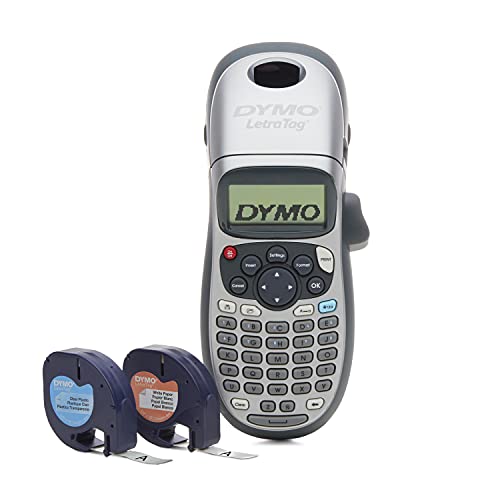 DYMO LetraTag 100H Plus Label Maker
DYMO LetraTag 100H Plus is a portable label maker with customizable fonts, styles, and direct-thermal technology, ensuring efficient labeling without needing ink or toner.
 Makeid E1 Rechargeable Label Maker
The Makeid E1 offers dual printing modes, a rechargeable battery, a large backlit screen, versatile label widths, and a QWERTY keyboard for efficient, creative labeling.
Subscribe to hear about new gadgets!
Join today and make informed decisions with honest gadget reviews and handpicked recommendations.
The Breakdown
- Portable and lightweight
- User-friendly QWERTY keyboard
- Versatile printing options
- Reliable thermal technology
- Automatic and manual features enhance ease of use
- Display could be larger for better visibility
- Limited to one tape width
- Manual cutter requires a bit of elbow grease
Compact and Ready to Travel
The Brother P-Touch PTM95 sports a sleek, lightweight design that makes it perfectly portable. It’s easy to tote from desk to drawer, or even out on the road. The user-friendly QWERTY keyboard mimics a computer style, making typing as easy as pie. Plus, the 12-character display ensures you see exactly what you’re labeling, no surprises!
More Than Just Labels
This label maker doesn’t stop at just printing standard labels. With 9 type styles, 10 framing options, and over 200 symbols, your labels can reflect your personality or mood. The cherry on top? Eight DECO mode patterns add a touch of fun to your organizing projects, proving that practical can also be pretty!
Mighty and Reliable
Don’t let its small size fool you; the Brother PTM95 is built to last. The thermal printing technology ensures each label is crisp and clear, without the hassle of ink or toner. Whether you’re labeling files, pantry items, or creating name tags, each label comes out perfect. The manual cutter adds a practical touch, letting you snip your labels with precision.
Labeling at the Push of a Button
From the moment you take the PTM95 out of the box, it’s a breeze to use. The intuitive controls and features like label length setting and vertical printing mean you spend less time fussing and more time labeling. It’s so easy that even the most tech-challenged can master it in minutes!
Bang for Your Buck?
With its plethora of features packed into a compact frame, the Brother P-Touch PTM95 offers fantastic value. It’s priced affordably, making it accessible for everyone from students to small business owners. Considering its versatility and durability, this label maker is an investment that pays off in organized dividends!
The Competition
- Thermal printing technology means no additional costs for ink, ribbons, or toner
- The simple interface and clear instructions make it a breeze to use
- A variety of fonts and styles allows for personalization
- Requires the use of DYMO’s proprietary 1/2″ LT Labels, which may be pricier than generic
- While the auto-off feature helps conserve power, frequent users might need to replace batteries often
The DYMO LetraTag 100H Plus Label Maker is an excellent tool for anyone seeking a simple way to organize their space. This compact, portable device offers a range of customizable options including multiple font sizes, print styles, and box styles. Its graphical display allows users to preview labels before printing, ensuring accuracy and satisfaction. Utilizing direct-thermal print technology, it eliminates the need for expensive ink or toner, making it cost-effective. With the added convenience of a magnetic holder and multi-language support, the LetraTag 100H Plus is practical for home or office.
- Long-term savings with the rechargeable battery and efficient use of label tape
- The large screen with backlighting and intuitive keyboard design make it accessible to everyone
- Perfect for home and professional use, can print up to 9 labels simultaneously
- Access to creative labeling features require the app, which might not appeal to everyone
- The dual mode and app features may require a bit of learning for those not tech-savvy
The Makeid E1 Bluetooth Rechargeable Label Maker revolutionizes home and office organization with its dual printing modes. They allow seamless switching between direct keyboard use and app-based creativity. It also features a large, backlit 3.4” screen for easy visibility and navigation. A rechargeable lithium battery reduces waste and cost by eliminating the need for disposables. It supports multiple label widths for versatile applications, and its efficient design minimizes label margin waste. The QWERTY keyboard and ability to print up to 9 labels at once, make the Makeid E1 a practical, modern solution for streamlined organization.
The Final Verdict
The Brother P-Touch PTM95 Label Maker is more than a gadget; it’s a powerful tool to help organize your life. Whether you’re labeling for work, home, or play, the PTM95 is up to the task. It’s fun, reliable, and easy to use—a winning combination in any book!
So, if you’re looking to organize your clutter, the Brother P-Touch PTM95 might just be your new best friend.
The FAQ
-
What types of labels can I create with the PTM95?
You can create a variety of labels using 9 different type styles, 10 framing options, and over 200 symbols. The PTM95 also includes 8 DECO mode patterns for more decorative labels.
-
Does the PTM95 require ink or toner?
No, the PTM95 uses thermal printing technology, which means it doesn’t require ink or toner to print labels.
-
Can I use different sizes of label tape with this label maker?
The PTM95 is designed to work with non-laminated M series tapes up to 12mm wide.
-
How do I replace the tape cartridge in the PTM95?
Open the back compartment, remove the empty cartridge, and insert a new tape cartridge. Ensure the tape is fed through the tape exit slot before closing the compartment.
-
What power sources does the PTM95 support?
The PTM95 operates on 4 AAA batteries, which are not included with the label maker.
-
Can the PTM95 print labels in different orientations?
Yes, the PTM95 supports both horizontal and vertical printing, allowing for greater flexibility in label creation.
-
Is there an auto-off feature to conserve battery life?
Yes, the PTM95 includes an auto power off feature to help conserve battery life when the device is not in use.
-
What are the dimensions of the PTM95, and is it portable?
The PTM95 is lightweight and highly portable, with dimensions that make it easy to carry in a bag or store in a small space. It measures approximately 6 inches in length and 4 inches in width.
-
Can I connect the PTM95 to a computer or smartphone?
The PTM95 is a standalone device and does not have the capability to connect to a computer or smartphone.
-
Where can I purchase additional tape cartridges for the PTM95?
Additional M series tape cartridges for the PTM95 can be purchased at office supply stores, online retailers, and directly from the Brother website.
Subscribe to hear about new gadgets!
Join today and make informed decisions with honest gadget reviews and handpicked recommendations.
