


By The Tech Guy
Hello, tech lovers! Today, we’re diving into the world of home printing with the HP DeskJet 2855e Wireless All-in-One Color Printer. Imagine a device that promises to handle your printing, scanning, and copying needs, all while sitting neatly on your desk. Let’s find out if it lives up to its promises!
The Recommendations
 HP DeskJet 2855e Wireless All-in-One Color Printer
HP DeskJet 2855e, a reliable wireless all-in-one printer with color printing, scanning, copying, and eco-friendly design, includes three months of ink and intuitive controls.
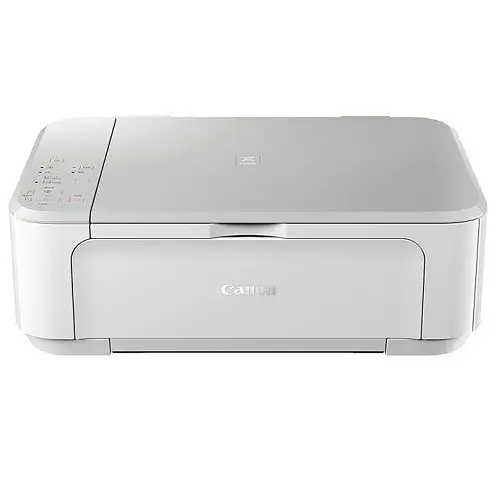 Canon PIXMA MG3620 Wireless All-in-One Printer
Canon PIXMA MG3620 combines efficient wireless printing for mobile and desktop, with diverse media compatibility and compact design, ideal for home office use.
Subscribe to hear about new gadgets!
Join today and make informed decisions with honest gadget reviews and handpicked recommendations.
The Breakdown
- Compact and stylish design fits small spaces
- Wireless connectivity and mobile app enhance user convenience
- Includes three months of ink—great for getting started
- Environmentally friendly with recycled materials and energy efficiency
- Print speed might not suit an office environment
- Only works with original HP cartridges
- Ink subscription required after the initial three months to maintain cost-efficiency
Sleek and Chic
First impressions matter, and the HP DeskJet 2855e does not disappoint. Sporting a compact design, it fits perfectly in any small office or home space. The printer’s minimalist look is enhanced by an intuitive control panel with an ICON LCD. It’s not just a printer; it’s a piece of modern art!
What Can It Do?
Now, let’s talk features! This printer offers color printing, scanning, and copying functionalities that are a breeze to use. With a 60-sheet input tray, it handles moderate home office tasks easily. The real game changer? It connects wirelessly—say goodbye to cable clutter!
Wireless printing means you can send documents from anywhere in your home. Plus, the HP Smart app lets you print, scan, and manage your printer from your smartphone. This is tech-savviness at its best!
Does It Deliver?
Moving on to the meat of the matter—performance. The HP DeskJet 2855e prints up to 7.5 pages per minute in black and 5.5 pages in color. While not the fastest printer, it provides good quality prints that are worth the wait for personal use. Whether it’s vibrant photos or crisp documents, this printer handles it all with grace.
Living with the Printer
Using the HP DeskJet 2855e is like having a reliable friend in your home office. The setup is straightforward, thanks to clear instructions and automatic Wi-Fi connectivity that keeps you online. Even during my test, when Wi-Fi was shaky, the printer quickly reconnected without a fuss.
The environmental enthusiasts will appreciate that it’s built with 60% recycled plastic and is ENERGY STAR certified. Saving the planet while printing? Yes, please!
Bang for Your Buck?
Considering its price point and features, the HP DeskJet 2855e offers significant value. Especially for those who print regularly but not in massive quantities. The initial free ink and potential savings from the HP Instant Ink program make this a wise choice for budget-conscious buyers.
The Competition
- Compact and stylish design fits in small spaces
- Extensive device and paper compatibility enhances its utility
- Wireless connectivity options make it extremely convenient
- Auto duplex printing is eco-friendly and economical
- Print speed is adequate, but not the fastest, which might not fit high volume printing needs
- Initial setup inks don’t last long, be prepared to purchase replacements
The Canon PIXMA MG3620 is a versatile and compact wireless all-in-one printer designed for efficient home office use. It supports easy mobile and tablet printing from iOS and Android devices. It also features compatibility with various paper types, from glossy photo paper to plain sheets. With quick wireless setup and robust printing options like AirPrint and Google Cloud Print, it offers convenience and flexibility. The printer also boasts auto duplex printing for cost-effective, two-sided printing. Its sleek design conserves space, making it ideal for small setups. Offering strong functionality and excellent value, the MG3620 is perfect for everyday printing needs.
The Final Verdict
Looking for a printer that scores high on functionality and style? The HP DeskJet 2855e should definitely be on your radar. It’s reliable, eco-friendly, and user-friendly—perfect for today’s tech-trendy and environmentally conscious consumer. In terms of sustainability, this printer steps up by incorporating recycled plastics and adhering to strict energy efficiency standards. It’s a choice that feels as good as it looks—minimizing your environmental footprint while still delivering high-quality prints.
So, if you’re ready to enhance your home office setup, the HP DeskJet 2855e might be the perfect match. Happy printing!
The FAQ
-
Can the HP DeskJet 2855e print from mobile devices?
Yes, the HP DeskJet 2855e supports mobile printing. You can print directly from your smartphone or tablet using the HP Smart app, available for both Android and iOS devices.
-
Does this printer come with any ink?
Yes, the HP DeskJet 2855e comes with three months of free ink when you activate HP+ and subscribe to HP Instant Ink. After the first three months, charges apply unless canceled.
-
Can I use third-party ink cartridges with this printer?
The HP DeskJet 2855e is designed to work only with cartridges that have HP original chips or circuitry. Non-HP cartridges or those modified might not work or could be blocked by the printer’s firmware.
-
What is the print speed of this printer?
The HP DeskJet 2855e has a print speed of up to 7.5 pages per minute (ppm) for black-and-white documents and 5.5 ppm for color documents.
-
Is the HP DeskJet 2855e energy efficient?
Yes, this printer is both ENERGY STAR certified and EPEAT registered, which means it meets strict energy efficiency and environmental criteria.
-
How do I connect the printer to my Wi-Fi network?
The HP DeskJet 2855e features easy wireless setup. Simply use the HP Smart app to connect the printer to your Wi-Fi network, and it will automatically detect and resolve connection issues for a stable setup.
-
What type of paper can I use with this printer?
The HP DeskJet 2855e can handle various paper types, including plain paper, photo paper, and brochure paper. Ensure to adjust the printer settings according to the paper type for optimal print quality.
-
Can I scan documents with this printer?
Yes, the HP DeskJet 2855e includes scanning capabilities. You can scan documents directly to your computer or mobile device using the HP Smart app.
-
How do I check the ink levels on the HP DeskJet 2855e?
You can check the ink levels directly from the printer’s control panel or through the HP Smart app. This lets you monitor your ink supply and order replacements as needed.
-
What is the warranty period for the HP DeskJet 2855e?
The HP DeskJet 2855e typically comes with a one-year limited hardware warranty. Additional coverage may be available through HP support services.
Subscribe to hear about new gadgets!
Join today and make informed decisions with honest gadget reviews and handpicked recommendations.
